Work Experiences About LinkedIn ↗
Enterprise UX Design Dashboard 2022

Neelkamal HR
Dashboard.

Replacing manual HR registers with one dashboard for a Patna steel manufacturer. A real-time HR dashboard with data visualisation, designed as Employee Experience Designer at Neelkamal Steels.

ConfidentialScreens are illustrative reconstructions with sample data. Employee, payroll and company details are withheld for confidentiality.
80% → 100% Task completion
15% Annual cost savings, as reported by the HR team
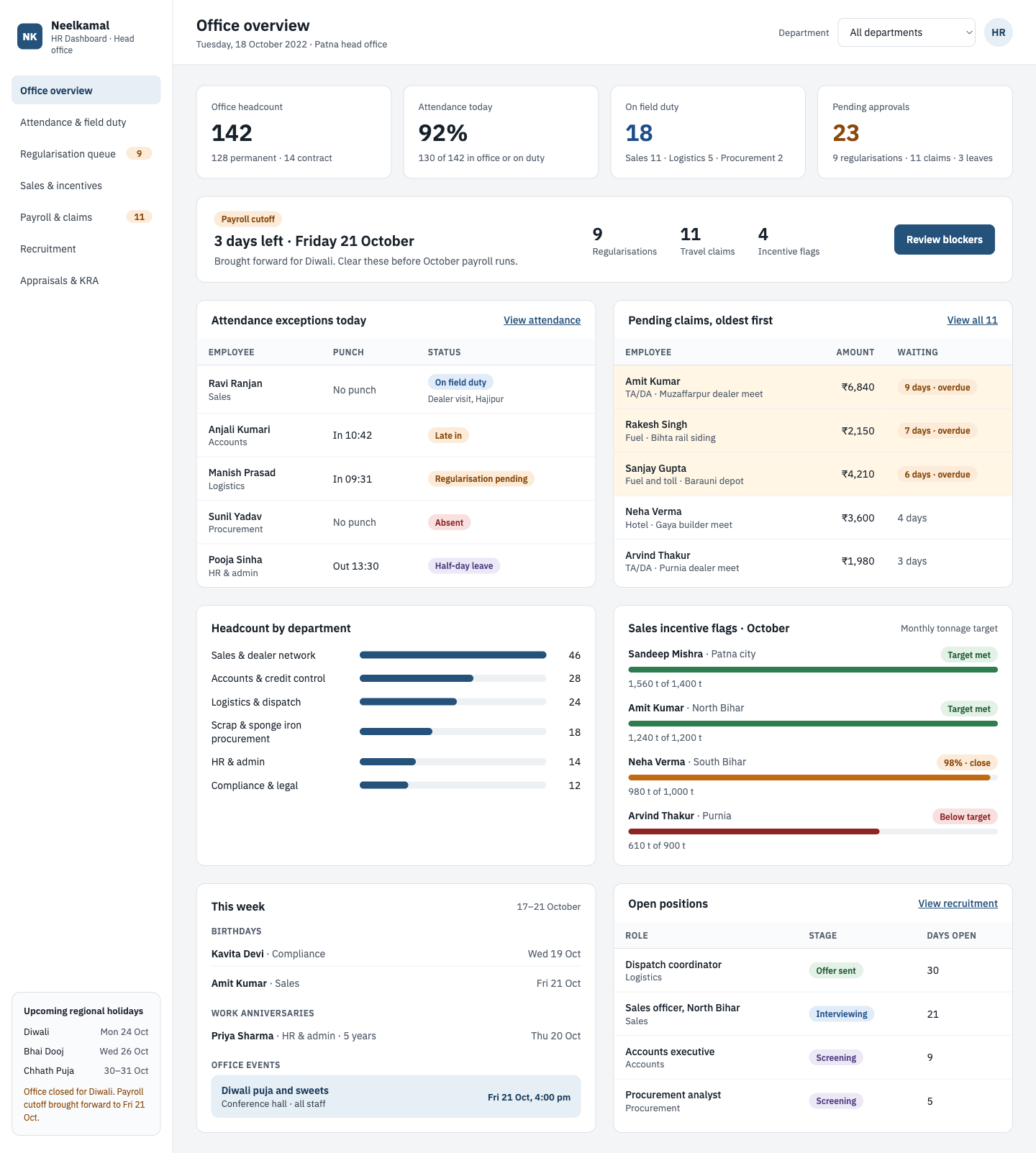
Office overview screen of the Neelkamal HR dashboard, showing KPI cards, a payroll cutoff countdown, attendance exceptions, pending claims oldest first, headcount by department, sales incentive flags, this week's events and open positions.
Office overview: KPIs, payroll cutoff countdown, attendance exceptions and claims oldest first.
— PROJECT INFO
Client
Neelkamal Steels, Patna, India
Role
Employee Experience Designer · sole product designer
Team
Engineering team · HR manager (stakeholder)
Timeline
2022 · 8 weeks
Platform
Web dashboard (desktop)
Users
HR team, department heads, office staff
Tools
Figma · Adobe XD · Excel (HR data audit)
— 01 · THE PROBLEM

From manual registers to one dashboard.

Neelkamal Steels, a steel manufacturer in Patna, tracked HR work in manual registers. I designed a real-time HR dashboard with data visualisation to bring that work into one place.

HR spent most of its time chasing and fixing data by hand instead of acting on it.

Neelkamal’s head office runs sales, scrap and sponge iron procurement, dispatch logistics and accounts. Most staff are permanent salaried employees, and many travel across Bihar to meet dealers and visit sites. Before this project:

  • →Attendance came from ZKTeco biometric machines at the gate, but every exception (late in, early out, missed punch) was checked and corrected manually.
  • →Field staff looked absent. Sales and logistics staff on dealer visits had no punch, so HR had to call managers to confirm each case.
  • →Leave balances (Casual, Sick, Earned) were tracked in spreadsheets and often disputed.
  • →Travel claims (TA/DA) were submitted on paper, with no view of which claims were waiting or for how long.
  • →Sales incentives depended on monthly tonnage targets, matched against sales data by hand before payroll.
  • →Payroll cutoff each month meant a rush to gather all of the above in time.
The result

Slow approvals, payroll errors, and frustrated field staff waiting for reimbursements.

— 02 · ROLE & PROCESS

Designing with HR and engineers.

I was the only product designer on the project. I designed the dashboard in Adobe XD and Figma, working closely with the engineers and the HR manager.

Design process

I followed a lean, Double Diamond-style process, sized to an eight-week project.

  1. Step 01
    Discover

    Contextual inquiry with HR during a payroll week, interviews with staff, and a review of existing registers and spreadsheets.

  2. Step 02
    Define

    Turned findings into key insights and design goals, and agreed priorities with the HR manager.

  3. Step 03
    Design

    Low-fidelity wireframes in Adobe XD, reviewed with the HR manager, then high-fidelity UI and a clickable prototype in Figma.

  4. Step 04
    Test

    Two rounds of usability testing with HR on the prototype, with a design change between rounds.

  5. Step 05
    Hand over

    Worked with the engineers through build, using a shared style guide.

Research

I started by sitting with the HR team to watch how a normal month actually ran, from first punch to payroll.

HR manager
What they need

One view of attendance, leave, claims and payroll status

Biggest frustration

Gathering data from many sources before every cutoff

HR executive
What they need

Fast way to approve or fix records

Biggest frustration

Calling managers to confirm who was on a field visit

Department head
What they need

Team headcount, attendance and performance

Biggest frustration

No visibility without asking HR

Field staff (Sales, Logistics)
What they need

Correct attendance and quick reimbursement

Biggest frustration

Marked absent while working; claims stuck for weeks

Key insights

The biggest time sink was not missing data but exceptions that the system could not explain.

  1. “Absent” often meant “on a dealer visit.” The biometric system only knew two states, present or absent. Field work needed a third.
  2. HR works backwards from the payroll cutoff. Every task (leave, claims, incentives) mattered because of the date payroll closed.
  3. Old claims hurt the most. A claim pending for a few days was fine; one pending for weeks left field staff paying out of pocket.
  4. Incentives created disputes. Sales managers wanted to see whether they had hit their tonnage target before payroll, not after.
  5. Local calendar shapes the month. Chhath Puja, Durga Puja and Diwali closures shift cutoffs and attendance every year.
— 03 · INFORMATION ARCHITECTURE

A sidebar of modules, one home screen.

I organised the tool into modules that follow HR’s monthly cycle, with one home screen pulling the urgent items from each.

Sidebar modules
  • Office overview
  • Attendance & field duty
  • Regularisation queue
  • Sales & incentives
  • Payroll & claims
  • Recruitment
  • Appraisals & KRA
Home screen
KPI cards
Headcount Attendance % On field duty Pending approvals
Panels
Payroll cutoff countdown Attendance exceptions Pending claims, oldest first Headcount by department Sales incentive flags This week (birthdays & events) Open positions Upcoming regional holidays

The KPI cards answer “how is today going?”; the panels below answer “what do I need to do?”, ordered by urgency.

How the data comes together

Each employee’s status is worked out by combining three sources, which HR used to match by hand.

PunchOD approvedLeave approvedStatus shown
Yes, on time——Present
Yes, after 09:30——Late
NoYes—On Field Duty
No—YesLeave
NoNoNoAbsent

A missing or wrong punch is fixed through a regularisation request, raised by the manager and approved by HR in the queue.

— 04 · KEY DESIGN DECISIONS

Key decisions, screen by screen.

Six decisions shaped the dashboard, each tied to a problem from research.

Decision 01

Attendance & field duty

Problem

Sales and logistics staff visiting dealers in places like Hajipur or Bihta showed up as absent.

Solution

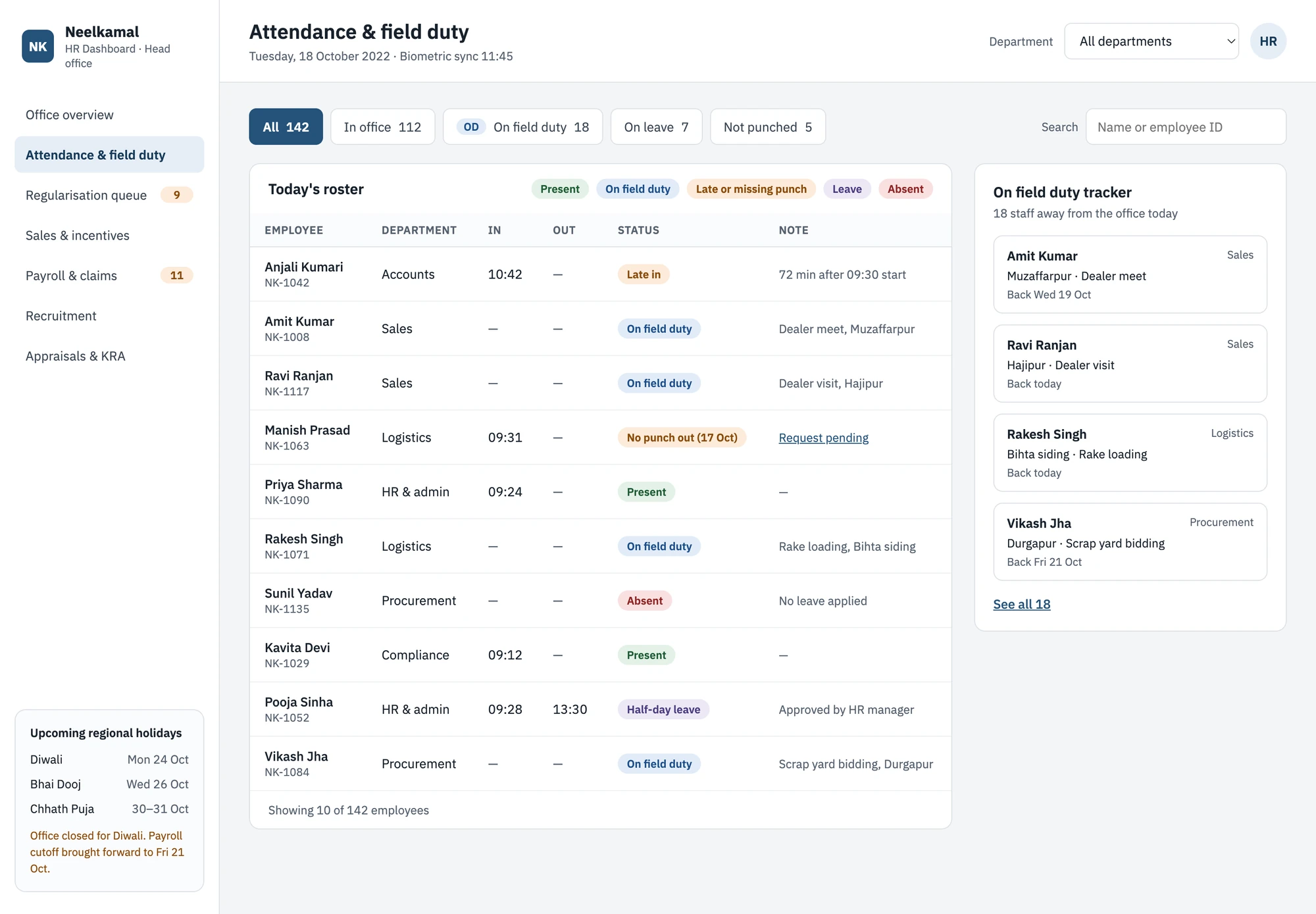
I added a third attendance status, On Field Duty (OD), shown as its own coloured chip next to Present and Absent. The employee’s manager raises an OD request with the location, purpose and return date, and an OD tracker lists who is out, where, and when they are due back.

Why it matters

HR stopped chasing false absences, and field staff stopped being penalised for doing their jobs.

Attendance and field duty screen: filter tabs with counts, today's roster table with colour-coded status chips, and an On field duty tracker listing who is out, where, and when they are due back.
Attendance & field duty: On Field Duty as its own status, with a tracker of who is out and when they return.
Decision 02

Regularisation queue

Problem

Fixing a missed punch meant a paper request, a call to the manager and a manual edit.

Solution

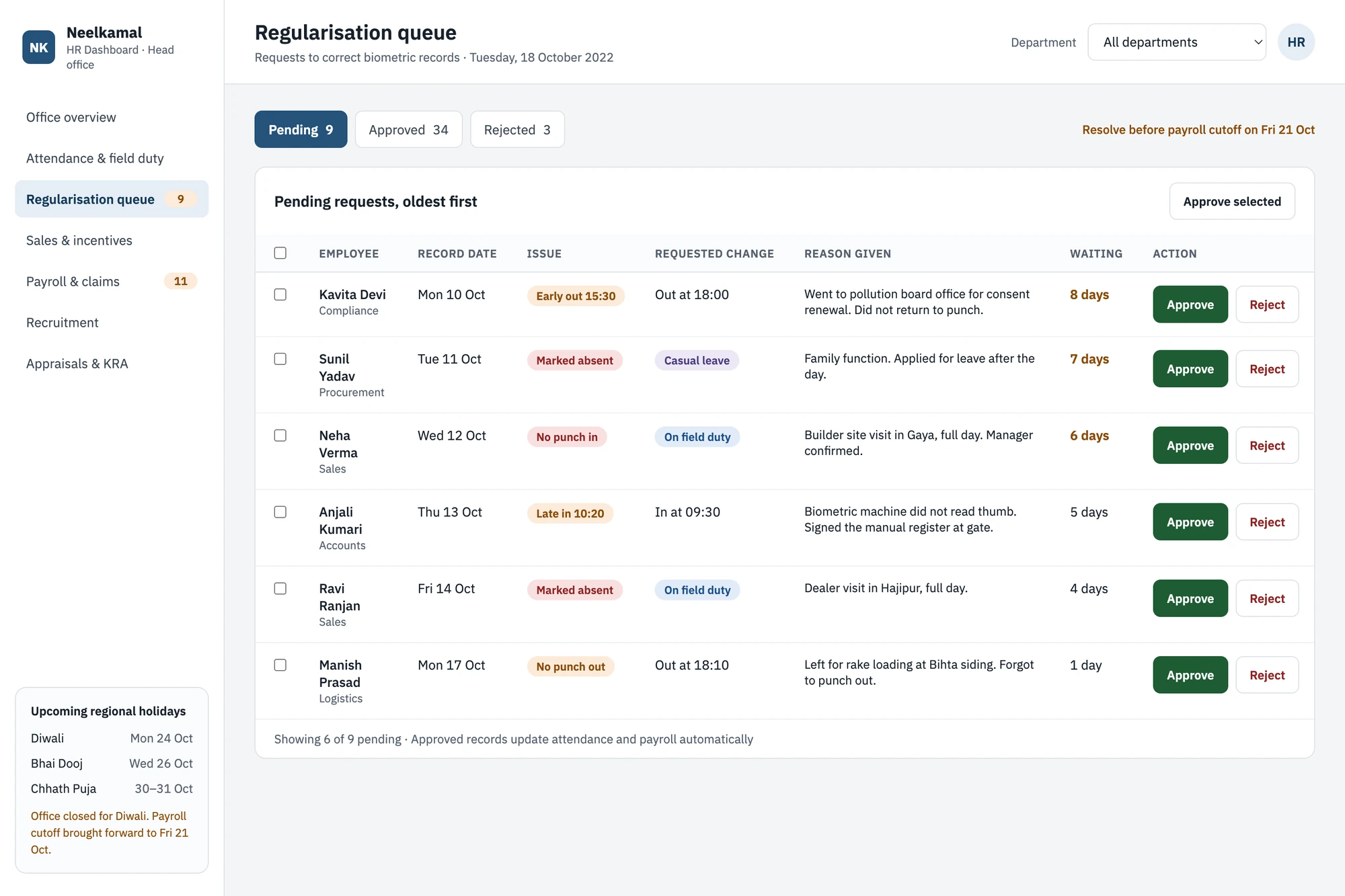
Managers raise correction requests for their team members, and these land in one queue showing the reason (e.g. “Forgot to punch out, left for a dealer visit”). HR approves or rejects from the row.

Regularisation queue screen: pending requests listed oldest first with the issue, requested change, reason given, days waiting, and Approve and Reject buttons on each row.
Regularisation queue: correction requests with the reason given, approved or rejected from the row.
Decision 03

Pending claims

Problem

Old TA/DA claims were buried under new ones.

Solution

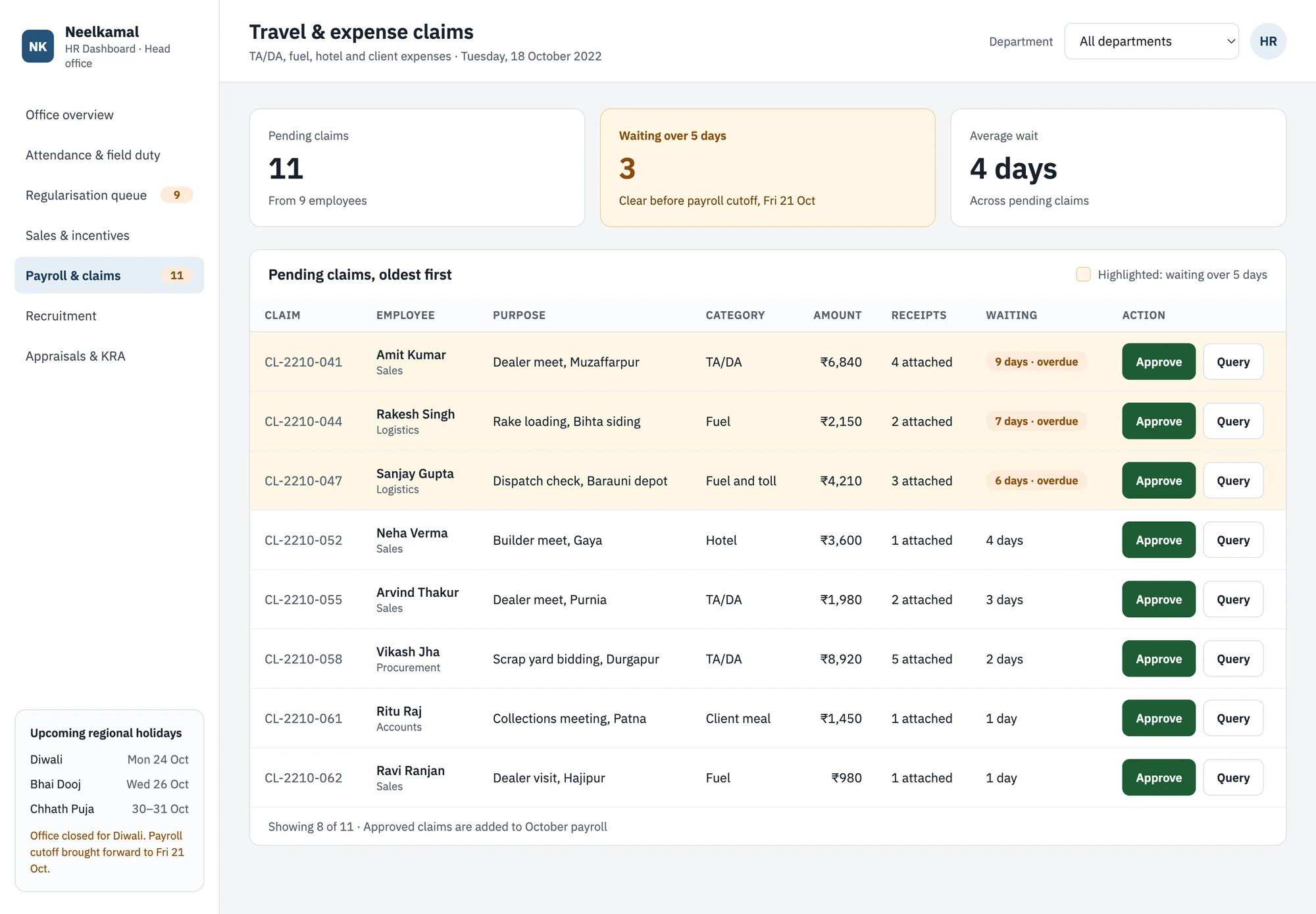
The home screen shows pending claims sorted by how long they have waited. Claims older than 5 days are highlighted so they are cleared first.

Pending claims screen: summary cards for pending claims, claims waiting over five days and average wait, then a table of claims oldest first with overdue chips, highlighted rows and Approve and Query buttons.
Pending claims: oldest first, with claims waiting over 5 days highlighted.
Decision 04

Payroll cutoff & incentive flags

Problem

HR only discovered blockers in the last days before payroll.

Solution

A countdown shows days left to cutoff, with counts of what still blocks it. Sales managers who hit their monthly tonnage target are flagged for incentive processing automatically.

Shown on the office overview at the top of this page.

Decision 05

Recruitment

Problem

Vacancies were tracked in emails and spreadsheets, so HR and department heads had no shared view of which roles were open or how far hiring had got.

Solution

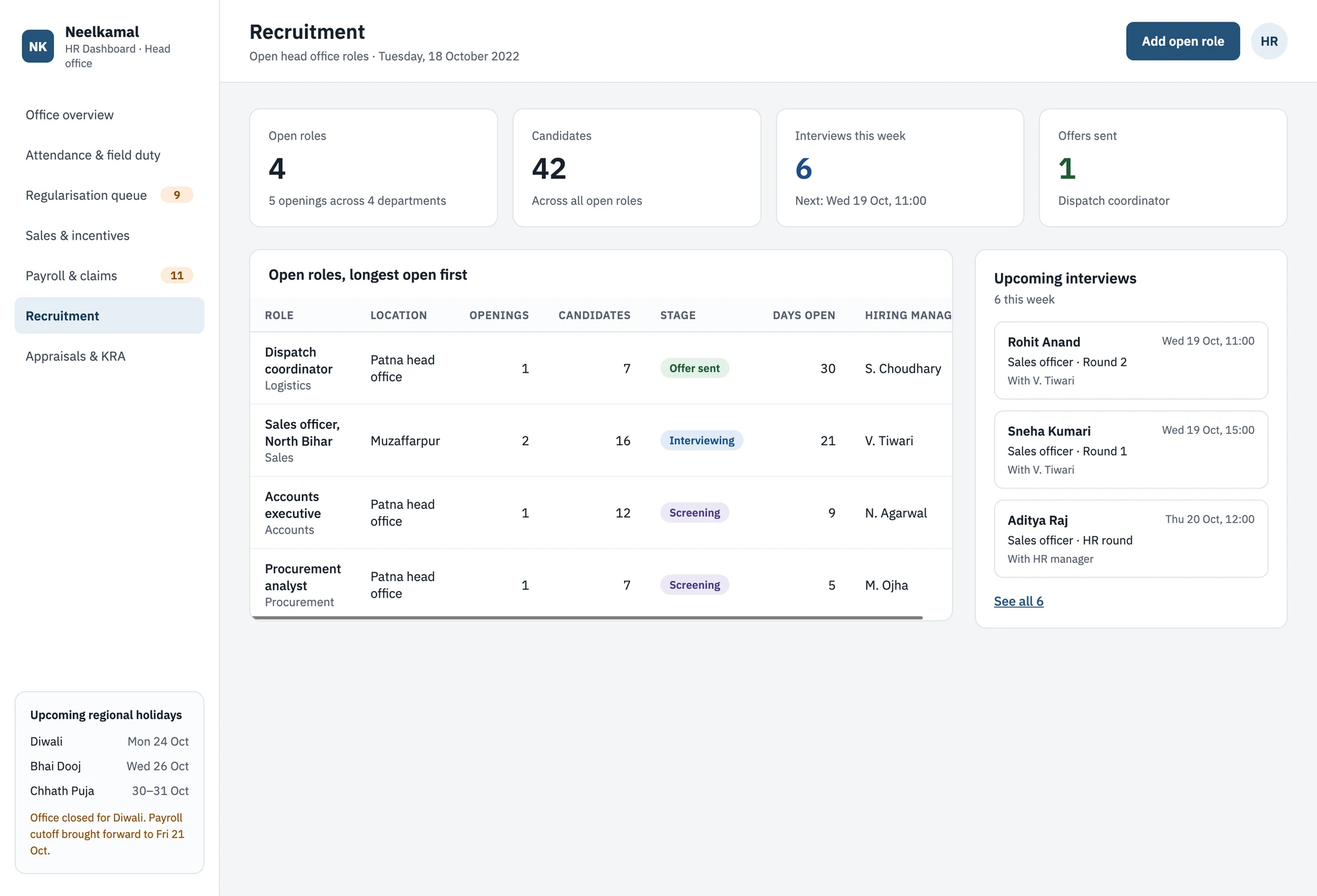
A Recruitment module shows each open role with its department, stage (Screening, Interview, Offer), number of candidates and days open, plus upcoming interviews. An “Open positions” card on the home screen keeps hiring visible next to daily HR work.

Recruitment screen: KPI cards for open roles, candidates, interviews this week and offers sent, a table of open roles with stage and days open, and a list of upcoming interviews.
Recruitment: each open role with its stage, candidates and days open, plus upcoming interviews.
Decision 06

This week panel

Problem

Birthdays, work anniversaries and office events were tracked informally and easy to miss.

Solution

A “This week” panel on the home screen lists upcoming birthdays, work anniversaries and office events, such as the Diwali puja, so HR can plan wishes and announcements ahead of time.

Shown on the office overview at the top of this page.

— 05 · DESIGN SYSTEM

The dashboard's visual language.

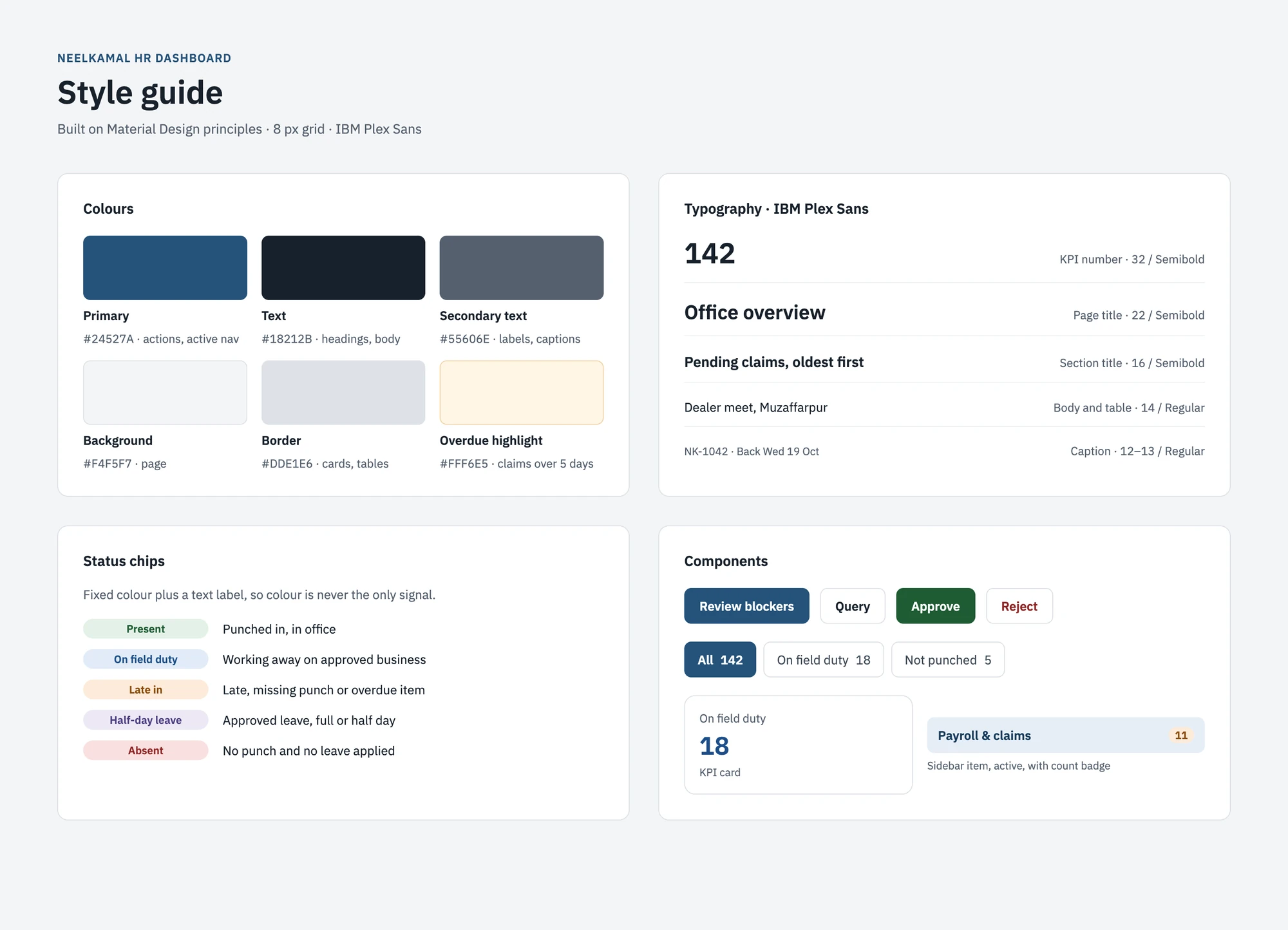
I built a lightweight style guide on Material Design principles, so the engineers could build every screen from the same set of colours, type and components.

Colours
Six colour tokens
Primary (steel blue)#24527A
Main actions, active navigation, charts
Text#18212B
Headings and body text
Secondary text#55606E
Labels, captions, metadata
Background#F4F5F7
Page background
Border#DDE1E6
Cards, tables, inputs
Overdue highlight#FFF6E5
Claims waiting over 5 days
Typography
IBM Plex Sans
Page title22 px / Semibold
Section title16 px / Semibold
Body and table text14 px / Regular
Labels and captions12–13 px / Regular
KPI number32 px / Semibold
IBM Plex Sans throughout, with tabular numbers so figures line up in tables.
Status chips
Five attendance states

Every status has a fixed colour and a text label, so colour is never the only signal.

PresentPunched in, in office
On Field DutyWorking away from office on approved business
Late / missing punchNeeds a check or regularisation
LeaveApproved leave, full or half day
AbsentNo punch and no leave
Style guide for the Neelkamal HR dashboard: six colour tokens, typography in IBM Plex Sans, five status chips and core components.
Style guide: colours, typography, status chips and components.
— 06 · IMPACT & OUTCOMES

What changed.

Task completion rose from 80% to 100%, and the HR team reported 15% annual cost savings.

80% → 100%
Task completion
15%
Annual cost savings, as reported by the HR team
Usability testing

I ran two rounds of usability testing with HR: task completion rose from 80% in the first round to 100% after one design change.

1 · Method

I sat with a member of the HR team in front of the Figma prototype and gave them real tasks from their working day, for example:

—“Which claim should you approve first?”
—“Find who is on field duty today”

I watched where they hesitated or clicked the wrong thing, and noted whether each task was completed without help.

2 · Round 1
80%

Result: an 80% task completion rate across all tasks.

What failed: the task “Which claim should you approve first?” The HR user picked the claim at the top of the list, the newest one, instead of the one that had waited longest. In the prototype, claims were listed in the order they were submitted, and nothing marked the overdue ones, so nothing pointed to the oldest claim.

3 · What I changed
—Claims are now sorted oldest first by default, and the panel title says so: “Pending claims, oldest first”.
—Claims waiting more than 5 days get a highlighted row and an “overdue” chip showing how many days, for example “9 days · overdue”.
—A summary card at the top shows how many claims are over 5 days, next to the payroll cutoff date.

This turned the claims panel from a list into a to-do order: the claim HR should approve first is now always at the top.

4 · Round 2
100%

After the changes, I ran the same tasks again with HR. Task completion rose from 80% to 100%, and the claims task was completed correctly first time.

Outcome and impact

The dashboard replaced manual registers and spreadsheets as HR’s daily starting point, and gave management one reliable view of the office workforce.

  • →Better decision-making: HR and management could see attendance, field duty, claims and incentives in one place instead of piecing them together by hand.
  • →Fewer false absences: field staff on dealer and site visits were recorded as On Field Duty, not absent.
  • →Faster approvals: regularisations and claims were cleared from one queue, oldest first, before payroll cutoff.
— 07 · WHAT’S NEXT & WHAT I LEARNED

What’s next & what I learned.

Phase 2: future scope

In Phase 1, managers raised OD and correction requests for their teams. Phase 2 moves that work to employees themselves.

  1. Employee dashboard

    For every staff member: own attendance, raise OD and regularisation requests, apply for leave, submit claims and track their status, download payslips. Solves: HR enters requests on staff’s behalf, and staff can’t see where their requests are stuck.

    All staff, HR
  2. Payroll pre-check screen

    Errors found only after payroll runs.

    HR, Accounts
  3. Sales incentive leaderboard

    Disputes over targets and payouts.

    Sales managers
  4. Auto-reminders via WhatsApp/SMS

    Approvals and missed punches forgotten.

    Managers, all staff
  5. Department cost view

    Owners can’t see cost per department.

    Management
  6. Hindi / English toggle

    Not all staff comfortable in English.

    All staff

Learnings and reflections

Learning 01
Watch the work, not just the interview.

The HR team asked for a way to track field duty in our first interviews. Watching a payroll week showed me how much time the problem really cost, which made it the clear priority.

Learning 02
Design for exceptions.

Most of HR’s effort went to the small share of records that didn’t fit; designing for those had the biggest impact.

Learning 03
Context is a feature.

Local holidays, steel-industry roles and simple language made the tool feel built for Neelkamal, not adapted from a template.

Learning 04
Next time

I would measure baseline times before launch, so the impact could be shown in hours saved as well as cost.

15%
annual cost savings, as reported by the HR team.