Work Experiences About LinkedIn ↗
MSc Dissertation UX Design AI · Personalisation 2025–26

PoseU —
posing, without the performance.

An AI-driven pose app that shows you the right pose for your body, your outfit, your moment — and never touches your photos. Designed solo, end-to-end, through four Lean UX iterations.

0→100% Privacy-trust task, Hi-Fi 1 to 2
6 Hypotheses validated to 100%
12 User & expert interviews
Solo Designer, end-to-end
— 01 · THE PROBLEM

Posing stopped being about memories.

On Instagram and TikTok, photography became identity work — and for a lot of people, that's where the anxiety starts. You open the camera and freeze. You don't know what to do with your hands. You copy a pose from Pinterest and it looks nothing like it did on the model, because their body, outfit, and confidence aren't yours.

The tools that exist don't help. Influencer tutorials and filter apps sell one narrow, idealised look. They rarely represent different body types, cultural dress, or ability — so the people who most need reassurance are the ones the references exclude.

Every
participant described photo anxiety — hands and expression named as the hardest parts
Zero
existing tools represent their body type, cultural dress, or everyday context
No
photo uploads users would accept — privacy surfaced as a dealbreaker, not a feature

"I try poses from Pinterest, but copying often feels awkward. Afterwards, I usually regret it."

— Participant, user interview

That gap set two research questions:

Research Question 01
What does a personalised pose experience look like for users with varied body types and fashion contexts?
Research Question 02
How can a digital tool provide inclusive, empowering styling support — without relying on professional help, or on the user's photos?
— 02 · ROLE & PROCESS

Solo designer, end-to-end.

The challenge was validating whether personalisation itself builds confidence — before any AI model exists to power it.

Role
Solo UX Designer · Research → IA → Prototype → Testing
Context
MSc UX Design dissertation · Kingston University
Duration
Lean UX · 4 validation rounds · 2025–26
Type
AI-driven concept · high-fidelity MVP prototype
Tools
Figma · Miro · Google Forms · Otter.ai · Gemini
Think
Understand the problem

10 user + 2 expert interviews, secondary research, competitor analysis, affinity mapping.

Make
Ideate & prototype

Assumptions → hypotheses (Gothelf prioritisation) → IA → Lo-Fi → Hi-Fi.

Check
Test & refine

Moderated usability testing across 4 rounds, weighted task scoring, iteration.

Outcome
Validated MVP

All six hypotheses at 100% by Hi-Fi 2. Feedback shifted from problems to feature requests.

The decision that defined the product

My first instinct was the technically obvious one: a camera / AR overlay that traces poses onto you in real time. I killed it. The research was clear that the barrier was emotional before it was functional — asking a camera-shy person to point a live camera at themselves and upload images doesn't reduce the anxiety, it is the anxiety. I moved to an avatar-based model instead: no photos, no uploads, no comparison to a stranger's body.

— 03 · DESIGN PRINCIPLES

The beliefs that shaped every decision.

Three principles came out of the research and guided every choice — from interaction logic to what I deliberately chose not to build.

Principle 01
Emotional comfort before aesthetics

Design fails at the feeling level before it fails at the usability level. The job was to reduce anxiety, not to produce a more "perfect" pose.

Principle 02
Privacy is the product, not a setting

Every mention of camera analysis or photo storage raised a concern in research. So the whole system was built to work without a single uploaded image.

Principle 03
Show, don't dictate

People want a friend, not a critic. Guidance is visual-first and reassuring, and every recommendation explains why — supportive, never corrective.

— 04 · USERS & RESEARCH

Who I was designing for.

Ten semi-structured user interviews and two expert interviews, recruited across Instagram, Facebook, and WhatsApp for diversity in body type, gender expression, and cultural background. I synthesised them through affinity mapping into three insights that drove every design decision.

📷
Primary User
The Camera-Shy
18–35, active on Instagram and TikTok, but tense and self-conscious the moment a camera appears. Overthinks hands, posture, and expression. Needs reassurance, not correction.
Secondary User
Content Creators
Fashion enthusiasts and creators seeking variety and relatable, body-positive pose inspiration that isn't the same recycled "model-type" look.
🎤
Experts
Stylists & Photographers
Two expert interviews grounded the pose logic in real professional knowledge of posture, gaze, and body balance — translated into everyday, accessible guidance.
What the research told me
Three insights, synthesised from 12 interviews via affinity mapping
Insight 01 — The barrier is emotional
Posing feels "awkward" or "forced." Hands and facial expression are the hardest parts, and multiple retakes are the norm. The discomfort is about confidence, not lack of instruction.
Insight 02 — Representation is missing
Online inspiration doesn't translate to real bodies. Existing guides feature slim, light-skinned models in idealised settings — users wanted real people across sizes, complexions, cultures, and everyday or traditional outfits.
Insight 03 — Trust is conditional on privacy
Users want a friend, not a critic: warm, reassuring guidance over perfection-driven advice — and an absolute guarantee that their photos are never stored or shared.

"I can see the pose rather than guessing… it feels like a friend giving a small boost."

— Participant, usability session
— 05 · SIMULATING AI, HONESTLY

AI-driven — and honest about how.

PoseU is designed as an AI-driven product. It does not run a trained model, and I'm deliberately clear about that — because implying a live model exists falls apart the moment anyone technical asks a question. The honest version is the stronger one: the goal was to validate whether personalisation itself builds confidence and trust before any ML engineering exists. That's a de-risking move, not a shortcut — and it hands a future team a validated interaction model instead of a guess.

Decision 01
The recommendation logic
A rule-based decision model maps what the user tells the app — occasion, outfit, expression, body type — to a pose suggestion, shown through visual previews and short instructions rather than raw scores. It simulates data-driven recommendation behaviour in a form I could actually put in front of a participant.
Decision 02
The synthetic dataset — validated
The pose library was built from AI-generated imagery (Gemini) across diverse body types, skin tones, and contexts. But generating inclusive-looking images isn't the same as knowing they read as inclusive — so I tested them with a 15-participant pose-rating survey before building them into the logic.
Decision 03
Explainable-AI microcopy
Rather than a black-box suggestion, each recommendation surfaces a short, human rationale — "This pose supports shoulder balance and complements your outfit." Drawn from XAI research on trust: people accept AI recommendations when they understand why, and when the explanation stays concise.
The line I keep crisp
What I did not claim
Pose-estimation frameworks (OpenPose, MediaPipe, MoveNet) are referenced as what a deployed version would use for real-time feedback — they informed the guidance structure, they were not implemented. A technical interviewer will ask; the answer is already in the work.

What the pose-rating survey found

15 participants rated 12 AI-generated poses on a 7-point scale for confidence, comfort, and suitability. The results became the evidence behind the recommendation logic.

Dimension Strongest poses Avg score What it told the logic
Confidence Power Posture · Striding Confidence · Tall Elegance ~6.3 Open, forward-facing posture reads as "empowering" — confidence comes from openness and balance, not exaggeration.
Comfort Casual Natural Candid · Relaxed Beach Confidence ~6.2 Natural, candid poses feel "authentic" and "easy to do" — comfort comes from poses that look real, not staged.
Inclusivity Graceful Saree Flow · Mirror Pose ~6.2 Varied body shapes, outfits, and skin tones raise perceived authenticity — inclusivity strengthens relatability.
Composition Group Magazine Shoot 6.4 Highest overall — diverse group arrangements read as both aspirational and relatable.
— 06 · KEY USER FLOWS

From input to confident pose.

Three flows carry the whole experience — each designed to feel intuitive from the apps users already know, and to keep cognitive load low at the anxious moment.

Flow 01 — Onboarding & Avatar Setup
Building a body that feels like yours
Welcome
Height & Body Type
Expression Style
Avatar Ready
Flow 02 — Personalised Pose Suggestion
The right pose for the moment
Home
Select Occasion
Select Outfit
Pose Suggestions
Flow 03 — Guided Practice
Step-by-step, one action at a time
Choose Pose
Visual Preview
Step Guidance
Pro Tip / Reassurance
Save
— 07 · INFORMATION ARCHITECTURE

Structured around the posing journey.

The IA maps to five moments in the way users already think about preparing for a photo — so the experience feels intuitive rather than instructional, with privacy and reassurance built into the structure itself.

PoseU
Onboarding
Avatar Setup
Privacy Intro
Pose Suggestions
Occasion & Outfit
Recommendations
Guided Practice
Step Guidance
Pro Tips
Explore
Library & Search
Saved
Profile
Edit Avatar
Settings
— 08 · LO-FIDELITY DESIGN

Testing the flow before the pixels.

Two low-fidelity iterations validated the core proposition — step-based pose guidance without photo uploads — and confirmed input comprehension and the end-to-end journey before committing to visual design.
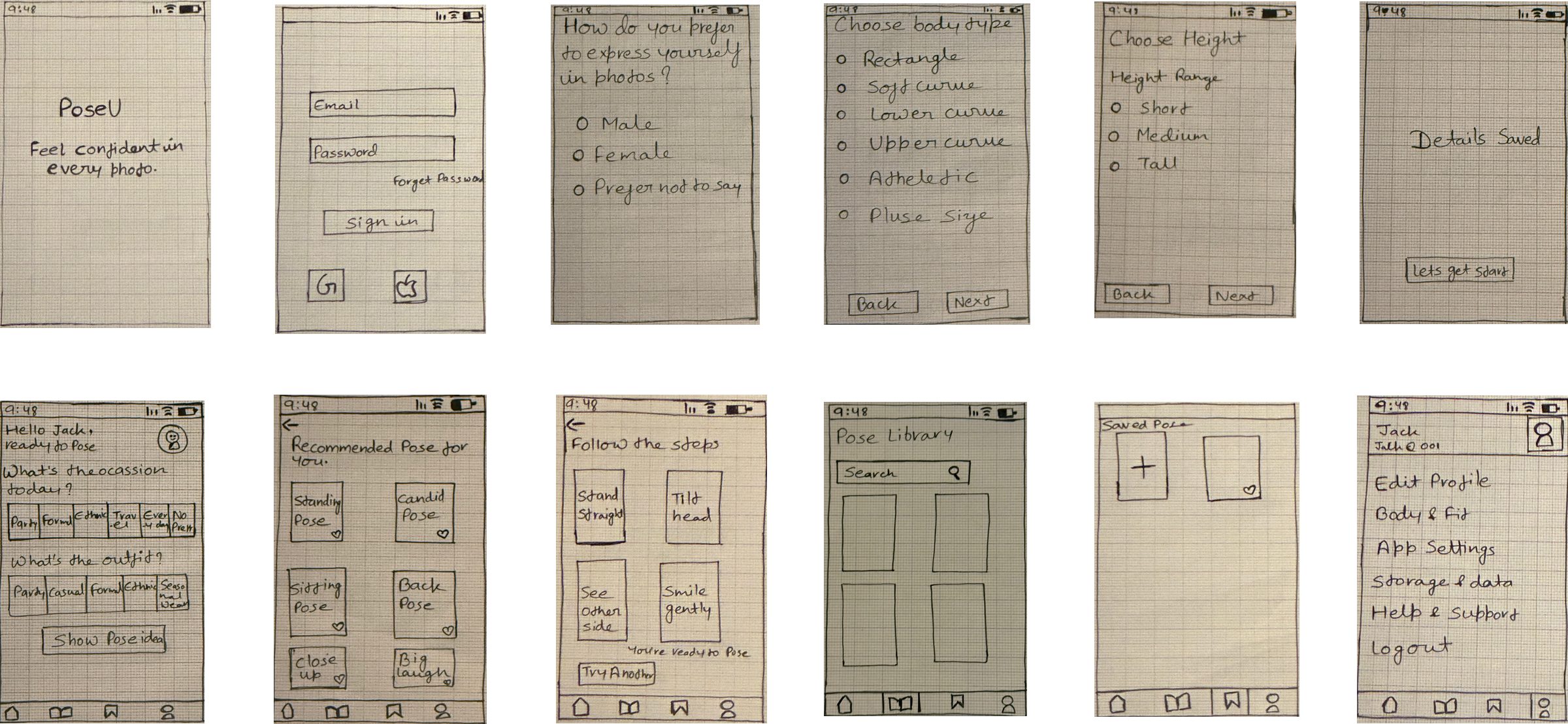
Full low-fidelity wireframe board: onboarding, occasion and outfit selection, pose suggestions, step-by-step guidance, pose library, saved poses, and profile settings
— · Design System

A visual language built for emotional ease.

Colour
A soft, non-clinical palette.
#6B4E8C
Plum
#E9A6B8
Blush
#F1EAF7
Lilac
#FBF6F0
Cream
#3A3E47
Ink
#FFFFFF
White
Warm and soft by intent — the palette had to feel emotionally safe, not clinical or perfection-driven, for an already self-conscious moment. (Placeholder — swap for your final Figma tokens.)
Typography
Legible, friendly, low-effort to scan.
Bold Screen titles
Semibold Labels and buttons
Regular Step guidance and body
Light Reassurance microcopy, captions
Chosen for quick scanning under low cognitive load — guidance is read in the moment, not studied. (Placeholder — confirm your final typeface.)
Tone & Microcopy
A friend, not a critic.
Reassuring, autonomy-supportive language — never corrective.
Explainable rationale on every recommendation ("why this pose").
Expression framed as "style, not a label" — no gender categories.
Component Principles
Visual-first, one action per step.
Show the pose first; then short, single-action steps.
Progressive disclosure to avoid text-heavy guidance screens.
Visible privacy signals at moments users expect a camera or upload.
Editable inputs everywhere — reduce decision anxiety with "edit anytime."
— 10 · HI-FIDELITY DESIGN

The screens that carry the experience.

Two high-fidelity iterations tested tone, readability, and confidence under realistic conditions. Every decision traces back to a research theme, a survey result, or a failed prototype task.

Avatar Onboarding
Pose Suggestions
Step Guidance
Library & Explore
Privacy & Trust
— 11 · KEY DESIGN DECISIONS

Every choice has a reason.

Hi-Fi Iteration 1 surfaced three specific failures. Iteration 2 fixed exactly those — and moved every hypothesis. These aren't cosmetic tweaks; each one traces to a task users struggled with.

Height Input
Unit clarity, not assumptions
Before
Slider with ambiguous cm values
After
→ cm / feet-inches toggle with helper text
Users weren't sure whether values were centimetres or feet — some don't know their height in cm at all. The toggle removed hesitation at the first step.
Outfit Selection
Specific, not broad
Before
Broad categories like "dress"
After
→ Accordion selector with visual outfit icons
Broad categories didn't feel personal enough, limiting perceived personalisation. Visual, specific options strengthened the sense that suggestions were tailored.
Step Guidance
One action per step
Before
Dense, text-heavy guidance screens
After
→ Short, scannable steps, single key action each
Text density risked cognitive overload in real-time use. Progressive disclosure kept guidance usable at the exact moment users needed it.
Privacy
Explicit, not inferred
Before
Trust left for users to infer from no uploads
After
→ Visible trust signals where users expect a camera
The privacy-trust task failed completely at 0% in Hi-Fi 1. Making the no-upload stance explicit — not assumed — took it to 100%.
The tempting feature
A live camera / AR overlay that traces the pose onto the user in real time — technically impressive, and the obvious "AI" showpiece for a portfolio.
Why I said: not this
It broke the one thing research said was non-negotiable — privacy — and it aimed the camera at the exact anxiety I was trying to reduce. Scoping it out to Future Work (with consent and on-device processing) was the more mature call than shipping the flashy version.
— 12 · IMPACT & OUTCOMES

Six hypotheses. All to 100%.

Most student case studies have one hero metric. PoseU has six independently tested hypotheses, all moving the same direction between high-fidelity rounds — each traceable to a specific design fix.

0%
Privacy-trust task — Hi-Fi 1
Trust made explicit
100%
Privacy-trust task — Hi-Fi 2
Hypothesis Focus Hi-Fi 1 Hi-Fi 2
H1Personalised suggestions80%100%
H2Step-based guidance40%100%
H3Inclusive representation20%100%
H4Minimal UI & onboarding20%100%
H5Reassuring prompts40%100%
H6Privacy-first trust0%100%
— 13 · REFLECTION

What I learned, what I'd change, what comes next.

What Worked
Killing the clever idea
  • Replacing the camera/AR idea with an avatar model — the research told me the barrier was emotional before it was functional.
  • Validating the recommendation logic with a real survey before building it into the product.
What I'd Do Differently
Test trust earlier
  • The privacy-trust task failed at 0% in Hi-Fi 1 — I'd surface trust signals from the first prototype, not assume users would infer them.
  • Larger, audited pose sets — inclusivity is only as good as the diversity of the examples.
What Comes Next
A real AI layer
  • Live pose estimation for optional real-time guidance — with explicit consent and on-device processing.
  • Avatar parameterisation and bias auditing on the dataset before it scales.

"PoseU taught me that design fails at the feeling level before it fails at the usability level — and that being honest about simulated AI is part of the evidence, not a caveat on it."

100%
six hypotheses validated — including trust, from 0 to 100.
"PoseU reframes posing from a performance into an act of self-expression."

Every screen traces back to something a participant said, a survey result, or a task that failed in testing. The AI is simulated — and I'm honest about that. That honesty is the work.